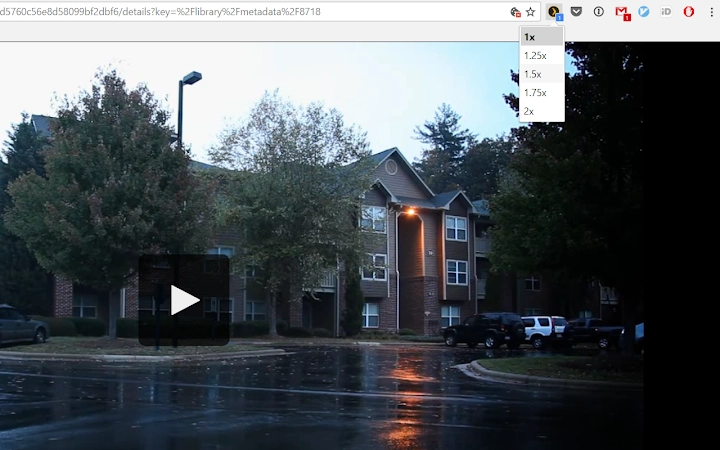
Screenshots
App details
- Version
- 1.1.2
- Size
- 1,001.67 KB
- Updated
- July 16, 2021
- Developer
- Roman
- Category
- Extension
SoftPas in:
This product is also available in the following languages:
About Plex Speed Extension for Chrome
Plex Web Player Speed Control
Overview
The Plex Web Player Speed Control extension is designed to enhance the video playback experience within the Plex Web Player interface. It enables users to adjust playback speed dynamically, offering a practical solution for those who want to optimize their viewing time without sacrificing comprehension. This functionality is particularly beneficial for educational content consumption, where users can increase playback speed to efficiently absorb information while maintaining understanding. The tool operates directly in the browser, requiring no additional software installation beyond the extension itself.
Target users include students, educators, and professionals who regularly engage with instructional or informative videos through Plex. The extension supports a seamless workflow for those who prefer to learn at their own pace or want to accelerate through familiar material. It is especially useful in scenarios involving lengthy lectures, tutorials, or training modules. While the developer did not provide additional background information, the extension's focused functionality suggests a targeted approach to improving user efficiency in media consumption.
Real-world usage scenarios include watching online courses, reviewing recorded webinars, or studying academic content. The ability to control playback speed allows users to customize their learning experience, making it more adaptable to different schedules and attention spans. The extension operates in the background, minimizing disruptions to the existing Plex interface while providing essential playback controls.
Key Features & Capabilities
- Dynamic Playback Speed Adjustment – Users can increase or decrease video playback speed in real time, enabling faster consumption of educational content without losing comprehension.
- Browser-Based Integration – The extension runs directly within the browser, working seamlessly with the Plex Web Player without requiring standalone software.
- Non-Intrusive Design – The control interface is minimal and does not interfere with the standard Plex player layout, preserving a clean viewing experience.
- Immediate Accessibility – Once installed, the speed control feature is available instantly on any video played through the Plex Web Player.
- Consistent Behavior Across Devices – The extension maintains uniform functionality across supported platforms, ensuring a reliable experience on both Windows and Mac.
For example, a student reviewing a two-hour lecture can increase playback speed to 1.5x or 2x, reducing viewing time while still absorbing key points. Similarly, a professional preparing for a training session may use the extension to quickly rewatch specific segments at higher speeds. The feature is especially effective when paired with note-taking or summarization workflows, allowing users to process content more efficiently.
User Interface, Workflow & Performance
The extension integrates directly into the Plex Web Player interface, adding playback speed controls without altering the core UI. Navigation remains intuitive, with the speed adjustment options accessible through a clearly labeled icon or menu item. The design prioritizes simplicity, ensuring that users can adjust playback speed with minimal effort and no learning curve.
Workflow efficiency is enhanced by the extension’s immediate availability after installation. Users do not need to configure settings or restart their browser; the feature is active as soon as a video begins playing. The extension operates in the background, with no visible impact on the video playback quality or buffering behavior.
Performance observations are based on general software behavior patterns. The developer did not specify resource usage details, and no performance benchmarks were provided. However, as a lightweight browser extension, it is expected to have minimal impact on system resources. Stability is assumed to be consistent with standard browser extension behavior, though real-world performance may vary depending on the user’s system and browser configuration.
Compatibility & System Requirements
The extension is compatible with Windows and Mac operating systems, supporting both platforms for use with the Plex Web Player. It requires a modern web browser with extension support, though specific browser versions were not listed. The installation size is 1.1 MB, indicating a lightweight footprint.
Exact system requirements were not listed. Compatibility information was partially provided, focusing on OS support rather than hardware specifications. The developer did not specify minimum CPU, RAM, or storage requirements. Users are advised to ensure their browser is up to date to maintain optimal functionality.
Pros and Cons
Pros
- Free to use with no hidden costs
- Lightweight installation at only 1.1 MB
- Direct integration with Plex Web Player
- Simple, intuitive interface for quick access
- Enhances learning efficiency for educational content
Cons
- Only works within the Plex Web Player environment
- No advanced playback features like skip intervals or bookmarks
- Limited to browser-based use; no desktop app integration
- Developer information not provided
- Exact browser compatibility details not specified
FAQ Section
Is the extension compatible with all web browsers?
Compatibility is confirmed for browsers that support extensions on Windows and Mac. Specific browser versions were not listed by the developer.
Is the extension safe to install and use?
The extension is designed to operate within the browser’s security model and does not access local files or personal data. It functions solely within the Plex Web Player context.
How often are updates released?
Update frequency was not specified. Users are advised to check the browser’s extension store for new versions.
Does the extension require a subscription or license?
No, the extension is free and does not require any license or subscription to use.
Can I use the extension offline?
The extension only functions when the Plex Web Player is accessed online, as it relies on the web-based player environment.
Final Thoughts
The Plex Web Player Speed Control extension delivers a focused, efficient solution for users who want to optimize their video consumption, particularly in educational contexts. Its lightweight design, seamless integration, and free access make it a valuable tool for students and lifelong learners. While it lacks advanced features and platform versatility, its core functionality is well-executed and purpose-built.
For anyone using Plex Web Player regularly and seeking to improve learning speed without compromising understanding, this extension offers a practical advantage. It stands out as a simple yet effective utility that enhances the existing media experience.
Download Plex Web Player Speed Control now
Guides & Tutorials
How to install Plex Speed Extension for Chrome
- Click the Download button above.
- Once redirected, accept the terms and click Install.
- Wait for the Plex Speed Extension for Chrome download to finish on your device.
How to use Plex Speed Extension for Chrome
This software is primarily used for its core features described above. Open the app after installation to explore its capabilities.
User Reviews
No reviews yet. Be the first to share your experience.
You may also like
more
BannedList Highlighter Extension for Chrome
A Chrome extension that automatically highlights entries from John Rentoul's boo...

Bring It Back Extension for Chrome
It is an extension developed to revive the "Discuss" button which disappeared fr...

Clicky for Slack Extension for Chrome
#Clicky for Slack is the fastest and easiest way to share your current tab to an...

wrap Extension for Chrome
Reverting Tumblr’s awful design choices, one at a time. Up to date, despite old...

heriff_v2 Extension for Chrome
Before you install:1. $heriff is not intended for user under the age of 13.2. Fr...

Cards View' Filter for Trello Extension for Chrome
Adds buttons for filtering cards by list in Trello's Cards view.Changelog:1.0 (2...